
Browse Articles
Select a Product
null Support Directory
Browse all null articles. (Last Updated
No articles found.
Search Results
No articles found.
Rise 360: When a Course Communicates Completion to an LMS
Article Last Updated Jan 29, 2026
This article applies to:
Rise 360 sends a completion status to your external learning management system (LMS) as soon as learners meet the completion requirement. You get to choose one of these tracking options when you publish:
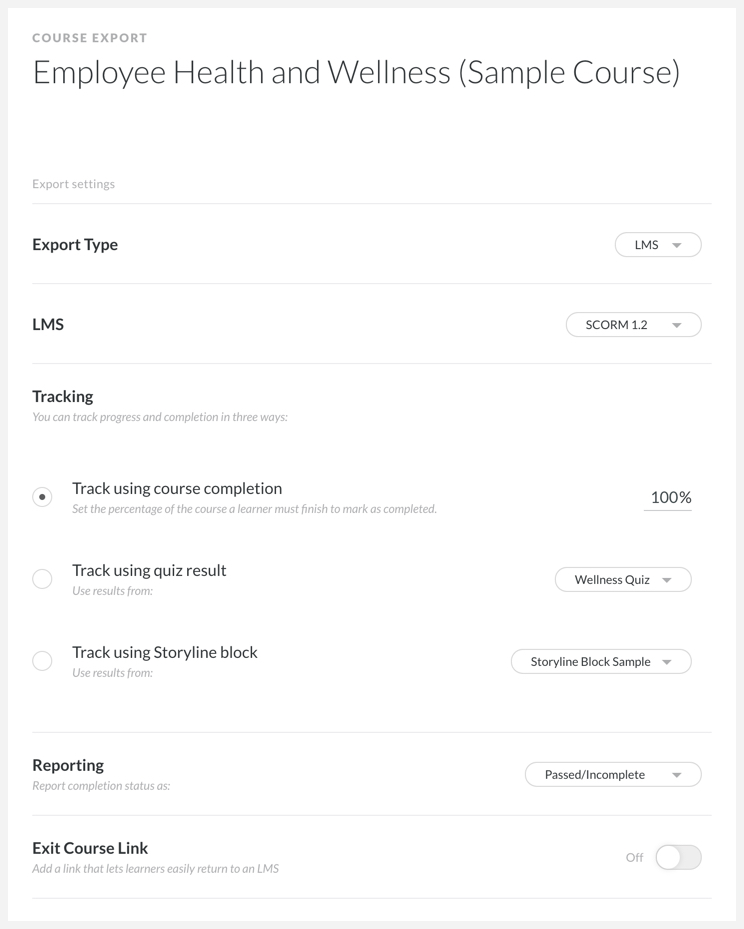
- When the learner has viewed a specific percentage of the course. This is measured per lesson and is satisfied when the last required lesson is completed. For example, if you have a 10-lesson course and set the course completion tracking to 50%, the completion requirement is sent to your LMS when the learner completes the fifth lesson.
- When learners reach a quiz result slide. This happens as soon as the quiz result slide for the specified quiz displays, not when the quiz result slide is closed. Read more about the quiz data sent to your LMS here.
- When learners interact with a selected Storyline block. This happens as soon as the learner interacts with the block.
Due to SCORM 2004 requirements, learners must fully exit the course for completion data to show in LMS reports. Create an exit button to ensure they exit successfully. For additional information on completion and success statuses, as well as how they’re affected by the various LMS standards, click here.
Finally, if you think your completion triggers aren’t being registered properly by your LMS, you can enable LMS debug mode. This generates diagnostic logs to give to your LMS administrator.
Note: When publishing training to Reach 360, you can set both course completion and quiz result as tracking parameters. If both are selected, learners must meet both requirements to complete the training.