
Browse Articles
Select a Product
null Support Directory
Browse all null articles. (Last Updated
No articles found.
Search Results
No articles found.
Articulate 360 AI: Understanding Your New Dashboard
Article Last Updated Sep 11, 2026
This article applies to:
On September 10, 2026, Articulate launched a new user experience for Articulate 360 AI subscriptions with AI enabled. Most notably, we've replaced the previous Articulate 360 dashboard and unified the separate Rise, Review, and dashboard experiences into a single layout with a helpful, collapsible sidebar that gives you quick access to your tools, libraries, and settings.
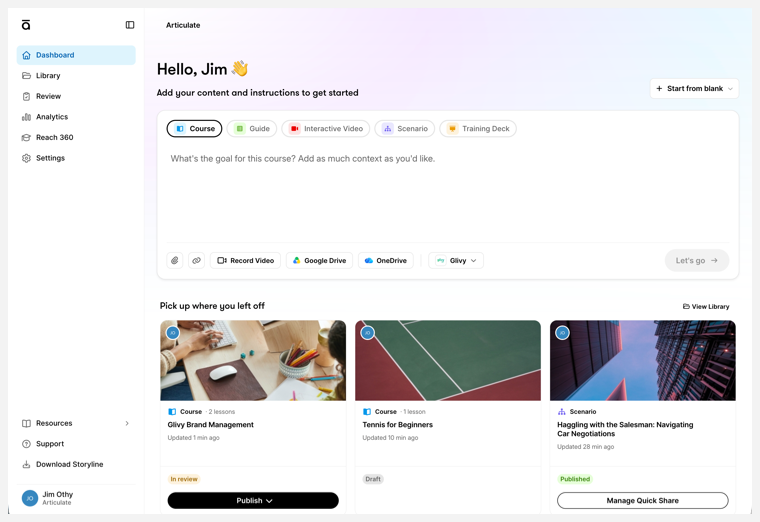
Keep reading to learn how to find your existing content, create new content, access analytics, and get answers to frequently asked questions.
Find Existing Content
All your Rise 360 and Review 360 content is still here and intact! We've simply made it easier to jump right to what matters most.
Quick Access
At the bottom of the dashboard, under the content generation prompt, you'll see your most recently accessed deliverables, arranged by last modification date. At a glance, you can see the author, deliverable type, and current status. In addition, each card has an action button, allowing you to take quick actions without opening the deliverable.
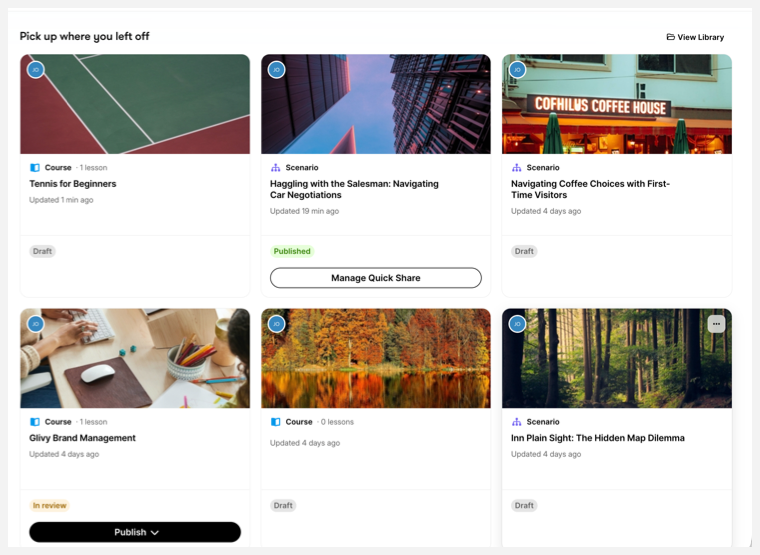
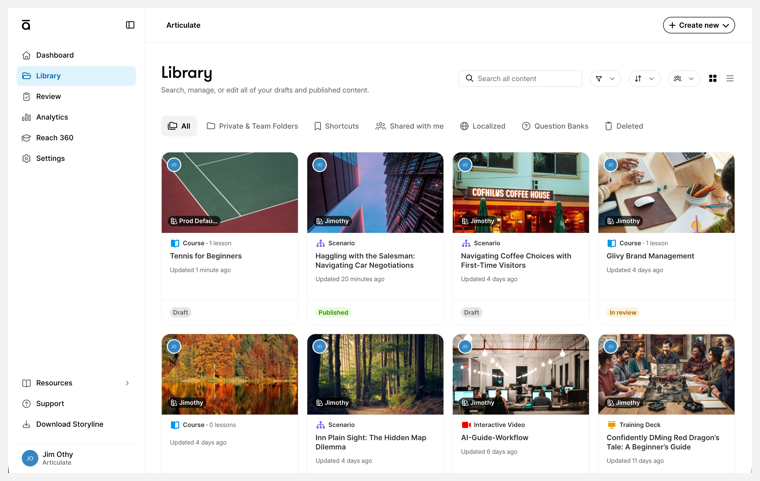
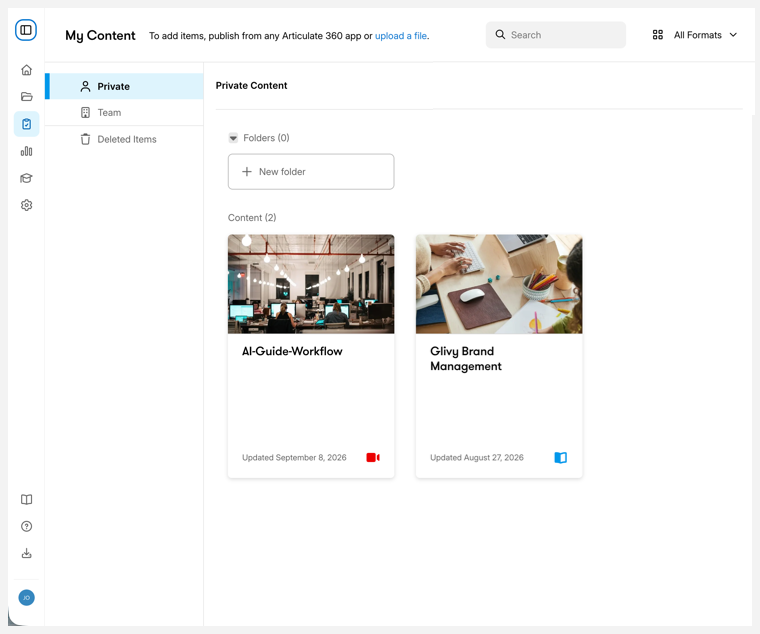
In the left-hand sidebar, you can access your Library and Review content. While they look different, each repository has been optimized based on user feedback to make it easier than ever to find what you're looking for.
Training Library
Review Library
Create Content
You can now do more from the dashboard, too. Content creation and discovery are right up front, so you can start building your training even faster. With the launch of the next generation of Articulate AI, all it takes is an idea and a source file or video to create brand-new, focused content deliverables that meet the needs of more learners.
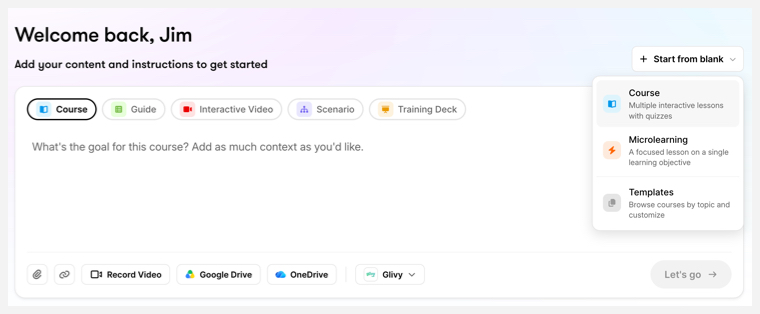
The main section of the dashboard lets you jump into content creation. You can still create blank course and microlearning content or start with template content, just like always. But now you can also use AI to generate deliverables directly from the dashboard:
- Course — contains multiple lessons and quizzes
- Guide — convert a video into a single-page step-by-step walkthrough of a process
- Interactive Video — convert a video into a structured training experience with chapters, transcripts, and summaries
- Scenario —a back-and-forth conversation in a chat-like setting
- Training Deck — slide-based presentation
Access Analytics
The left-hand sidebar also offers access to the all-new Analytics page.
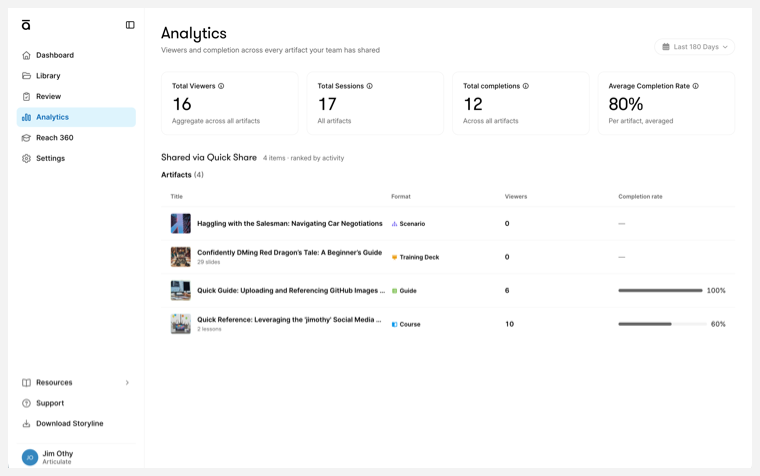
Here, you can measure the impact of the content you've published. This dashboard provides actionable data on how your audience consumes, understands, and interacts with your content, including insights and analysis of AI Tutor interactions.
FAQs
What happened to Rise 360?
While the entry point may look different, the content authoring experience is mostly the same as what you've been using in Rise 360. This update is designed to speed up content creation, unify your tools, and make your training library easier to navigate.
Is there a way to revert to the previous Articulate 360 experience?
At this time, the only way to revert to the legacy Articulate 360 dashboard, with separate Rise 360 and Review 360 apps, is to disable AI features entirely for your subscription. This means you'll lose access to all AI-enabled tools and will no longer be able to create the newly launched format types.
What happens if I've already created a new deliverable type but disable AI for my subscription?
New deliverable types created using the AI-enabled Articulate 360 AI experience will still be available in your library to edit, review, and deploy.
Is account management still accessed from the Profile menu?
To make account settings more easily accessible, we've moved this option to the sidebar under Settings.
Where can I find Support?
Just click the Support link in the sidebar to launch Artie AI, our automated support tool. Artie can provide status updates on system outages and planned maintenance, answer your questions, help troubleshoot issues, and even open up a case for you if needed.